
Check UAE Visa Status Online: Step-by-Step Guide
- BY VR1 Global
Check UAE Visa Status Online: Step-by-Step Guide
In this article, we’ll provide you with a step-by-step guide on how to check your UAE visa status online using official government portals.
If you’re planning a trip to the UAE, you’re likely aware of the importance of obtaining a valid visa. However, once you’ve applied for your visa, it’s equally important to stay informed about your visa status to ensure a smooth and successful trip.
By following our comprehensive guide and utilizing the resources available to you, you can stay up-to-date on your visa status and avoid any unnecessary delays or complications.
How to Check UAE Visa status Online
Checking your UAE visa status is a crucial step that should not be overlooked when planning your trip to the UAE.
Knowing the status of your visa can help you avoid any last-minute issues or complications that could arise while traveling.
By staying informed about the status of your visa application, you can take the necessary steps to resolve any issues that may arise and ensure a smooth and hassle-free trip.
Fortunately, checking your UAE visa status online has never been easier, thanks to the Federal Authority for Identity and Citizenship (ICA) website.
The ICA website provides a user-friendly and secure platform that allows you to track the status of your UAE visa with just a few clicks.
Whether you’re applying for a tourist, employment, or student visa, it’s important to carefully review and follow the specific requirements for your visa type.
Knowing the status of your visa application can save you time and money, and ensure that your trip to the UAE is stress-free and enjoyable.
By following the simple steps outlined in this article, you can easily check the status of your UAE visa and be well-informed about any updates or changes to your application.
Steps to Check UAE Visa Status Online
Step 1: Visit the official ICA website
To begin the process, visit the official ICA website at https://smartservices.icp.gov.ae/echannels/web/client/default.html#/fileValidity
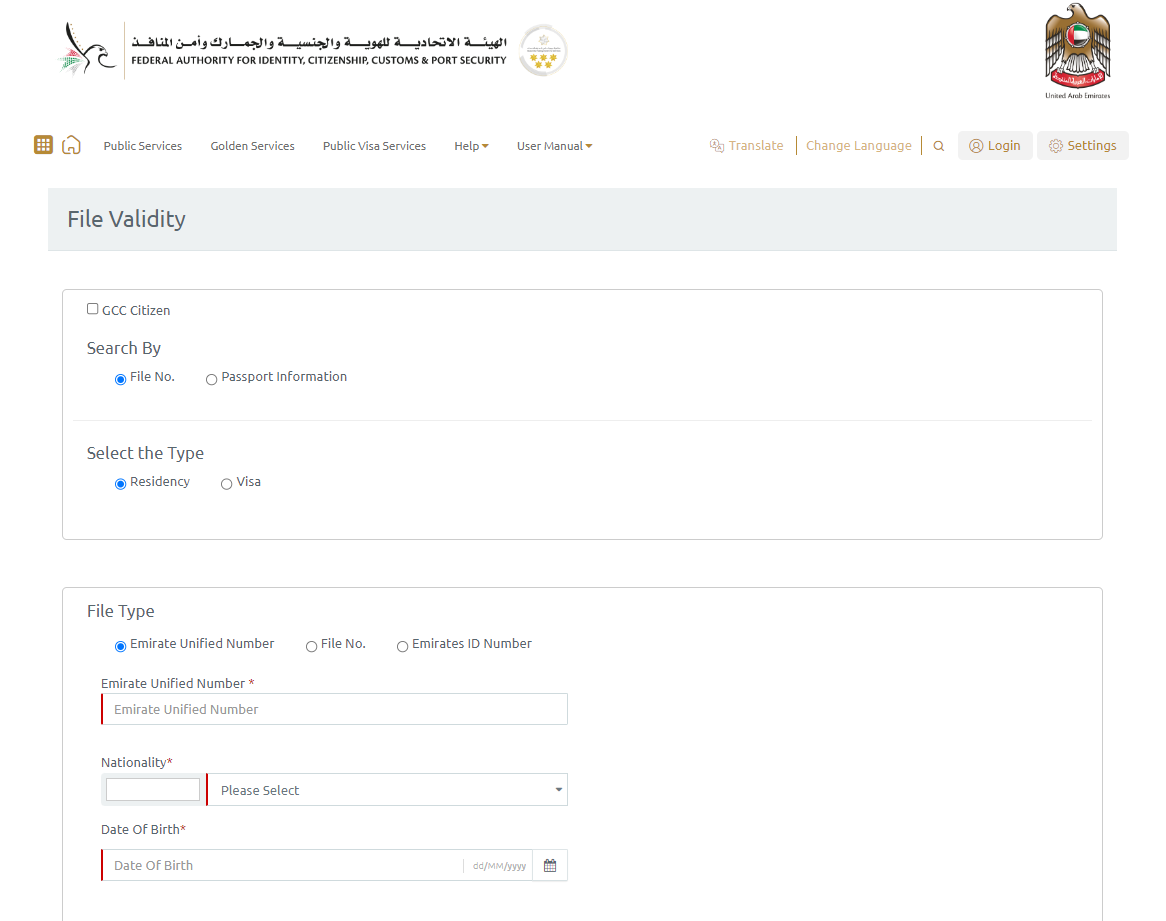
This is the official government portal that provides access to various services, including visa-related services.
Step 2: Navigate to the “Passport Information” tab
Once you’re on the ICA website, navigate to the “Passport Information” tab and select “Residency and Citizenship”.

This will take you to the visa services page where you can select the type of visa you have applied for.
Step 3: Select the type of visa
On the visa services page, select the type of visa you have applied for. You can choose from options such as tourist, employment, or student visa. Make sure to select the correct visa type to ensure accurate results.
Step 4: Enter your personal details
After selecting the visa type, you will be prompted to enter your personal details, such as your passport number, Expiration Date & nationality.
Ensure that the details you enter are accurate to avoid any errors in the visa status information.
Step 5: Complete the captcha code
To ensure the security of the portal and prevent automated requests, you will need to complete a captcha code.
Simply type in the characters displayed on the screen to verify that you’re not a robot.
Step 6: Submit your request
After completing all the required fields, click on the “Submit” button to view your visa status.
The portal will display the latest information about your visa application, including the status and validity of your visa.
Steps to check UAE Visa status in the GDRFA portal.
Step 1: Visit the GDRFA website
To begin the process, visit the official GDRFA website at https://www.gdrfa.ae. This is the official government portal that provides access to various services, including visa-related services.
Step 2: Navigate to the “Services” tab
Once you’re on the GDRFA website, navigate to the “Services” tab and select “Visa and Residency”. This will take you to the visa services page where you can check the status of your UAE visa.
Step 3: Select the “Check Residence/Visa Validity” option
On the visa services page, select the “Check Residence/Visa Validity” option. This will take you to the visa validity check page where you can enter your personal details to check your visa status.
Step 4: Enter your personal details
On the visa validity check page, enter your personal details, such as your passport number and residency file number. Ensure that the details you enter are accurate to avoid any errors in the visa status information.
Step 5: Complete the captcha code
To ensure the security of the portal and prevent automated requests, you will need to complete a captcha code. Simply type in the characters displayed on the screen to verify that you’re not a robot.
Step 6: Submit your request
After completing all the required fields, click on the “Submit” button to view your visa status. The portal will display the latest information about your visa application, including the status and validity of your visa.
Steps to Check UAE Visa status using UAE Pass or GDRFA Dubai
- Download the official UAE government app that corresponds to your visa application, such as the “UAE Pass” app or the “GDRFA Dubai” app.
- Open the app and select the option to check your visa status.
- Enter your personal details such as your passport number, nationality, date of birth, and residency file number (if applicable).
- Complete the captcha code or any other verification process to confirm that you’re not a robot.
- Click on the “submit” button to view your visa status.
Documents required to check UAE Visa status
To check your UAE visa status, you typically don’t need any specific documents. All you need is your personal information, such as your passport number, nationality, and date of birth.
However, it’s important to make sure that you have entered your personal information correctly and accurately. If you have any doubts or concerns, it’s a good idea to double-check your passport and other documents to ensure that the information you’re providing is correct.
In some cases, you may need additional information or documents to check your visa status.
For example, if you have applied for a residency visa, you may need to provide your residency file number.
If you have any questions about the documents or information required to check your UAE visa status, it’s a good idea to contact the relevant government authorities or embassy for assistance.
Check UAE Visa status Offline:
Checking UAE Visa Status Offline Using SMS
The General Directorate of Residency and Foreigners Affairs (GDRFA) in Dubai provides an SMS service to check the visa status offline.
You can check your UAE visa status by sending an SMS to 3989 using the format “RESIDENCE VISA <SPACE> VISA NUMBER.”
The visa number is available on the visa stamped on your passport. You will receive an SMS reply containing the details of your UAE visa status.
Checking UAE Visa Status Offline Using IVR (call)
Interactive Voice Response (IVR) is another way to check the UAE visa status offline.
You can call the General Directorate of Residency and Foreigners Affairs (GDRFA) at the toll-free number 8005111 and follow the instructions provided by the automated system.
You will need to provide your visa number and other details as requested by the IVR system.
Or you can also 600-522-222 from your Mobile which is registered to your passport to check your Visa status.
Checking UAE Visa Status Offline Using a Printed Application
You can check your UAE visa status offline by referring to the visa application printout. When you applied for the UAE visa, you received a printout of the application.
You can check the visa status by referring to the application number and reference number mentioned on the printout. These numbers can be used to track the visa status offline.
Read More:
FAQ for checking UAE Visa Status:
Q: How can I check the status of my UAE visa online?
A: You can check the status of your UAE visa online through the official government portals, such as the General Directorate of Residency and Foreigners Affairs (GDRFA) portal or the Federal Authority for Identity and Citizenship (ICA) website.
Q: What details do I need to check my UAE visa status online?
A: To check your UAE visa status online, you’ll typically need to provide personal details such as your passport number, nationality, date of birth, and residency file number (if applicable). You may also need to complete a captcha code to verify that you’re not a robot.
Q: How long does it take to check the status of a UAE visa online?
A: Checking the status of a UAE visa online is usually a quick and easy process that can be completed within a few minutes. However, the processing time may vary depending on the volume of requests and the efficiency of the government portal.
Q: Can I check the status of my UAE visa application through a mobile app?
A: Yes, some government portals offer mobile apps that allow you to check the status of your UAE visa application on the go. You can download the relevant app from the App Store or Google Play and follow the same steps as you would on the website.
Q: What should I do if my UAE visa status shows as “under process” or “pending”?
A: If your UAE visa status shows as “under process” or “pending”, it means that your application is still being processed by the relevant authorities. You may need to wait for a few more days or weeks until a final decision is made. If you have any concerns or queries, you can contact the relevant government authorities for assistance.
Q: Is it necessary to check the status of my UAE visa online?
A: Yes, it’s highly recommended to check the status of your UAE visa online regularly, especially if you’re planning to travel to the UAE. This will help you stay informed about any updates or changes to your application, and ensure that you have the necessary visa documents for your trip.
Q. Can I check my UAE visa status offline using my passport number?
A. Yes, you can check your UAE visa status offline using your passport number. Visit the ICA website or the Khaleej Times website to check your visa status using your passport number.
Q. How long does it take to receive an SMS reply for the UAE visa status?
A. You will receive an SMS reply within a few minutes after sending the SMS to 3989.
Q. Can I check the UAE visa status offline using a landline phone?
A. Yes, you can check the UAE visa status offline using a landline phone by calling the toll-free number 8005111 and following the instructions provided by the automated system.
Q. Can I check the UAE visa status offline if I do not have a residency ID?
A. Yes, you can check the UAE visa status offline using the methods mentioned in this article, even if you do not have a residency ID.
Q. Is it possible to check the UAE visa status offline for all visa types?
A. Yes, you can check the UAE visa status offline for all visa types using the methods mentioned in this article.
Conclusion,
I hope this article helped you to identify the best ways to “Check UAE Visa Status” both Online & Offline.
However, if you still have questions and are not sure how to check your Residence Visa status in Dubai or want to apply for an Investor Visa, make sure to contact us.
VR1 Global Business setup consultancy is one of the best company formation experts in Dubai, and if you are planning to start your own business here, you can contact our company formation experts who are adept at dealing with all of your queries and concerns without you worrying about the supporting documentation and procedure.
Call or WhatsApp +971508045640 today for a free consultation call with our business setup experts.